
Online booking for your business
Book online, not by phone — CLEVBOOK is online booking for courts, rooms, classes and appointments.
Courts · Rooms · Rentals · Classes · Appointments
Sunday, 21:47, your office is closed. Your customers book anyway, with no account and no phone call. On Monday, everything is already in your calendar.
Your industry isn’t listed? No problem. CLEVBOOK is for everything people book. See example industries
bookable. Even when your office is closed.
commission on bookings.
- Padel court
- Haircut
- Yoga
- Physiotherapy
- Bike
- Meeting room
Those were just six examples.CLEVBOOK is for everything people can book.
Your customers don’t need an account for it.
No commission on bookings · cancel monthly · booking data held in Switzerland
How people book today
Your customers want to book for themselves. Whenever it suits them.
People looking for something today want to see what's available and book on the spot. No phone call, no waiting for office hours.
I want to see what's still available.
✓ Live availability on your booking pageI book when it suits me. Even at 10 pm.
✓ Bookable around the clockNo phone calls, no hold music, please.
✓ Booked in two minutesNo account, no password.
✓ Name, number, e-mail. Done.
Move with the times: from a half-empty calendar to a full one.
If you don't offer flexible booking, you lose the booking to someone who does. CLEVBOOK started with exactly that: a double-booked tennis court.
BeforeWith CLEVBOOK
3 missed callsFully booked
- Lena 9:00Mon 09:00Lena W.Private lesson
- Duo? Ash…Mon 17:00Jonas W.Duo lesson
- Evening classTue 18:30Reformer6 of 6 booked
- Simon —
13:00 instead?Wed 13:00Simon R.booked online 23:05 - Mat (5?)Wed 19:00Mat Pilates12 of 12 booked
- Trial ??Thu 10:00Mia B.Trial lesson
- Call back!
Mrs K.Thu 16:00Anna K.booked online 06:12 - Nora ill?Thu 18:00Back careWaiting list: 2
- Mr B. cashFri 08:00Noah B.Private lesson
- Class off?Fri 17:30Prenatal8 of 8 booked
- Reformer 2
broken??Sat 09:00Elena T.booked online 21:47 - Booked twice!!Sat 11:00Julia M.Private lesson
Illustration with made-up sample bookings.
Ads
Explained in 30 seconds.
Short films about what happens without a booking system. Sound on. It is worth it.
These films were generated using artificial intelligence.
Clear commitments
Four things you can count on at CLEVBOOK.
They apply to every operator, from day one. No asterisks.
- 0%
0 % commission
On every booking, whatever the amount, in any trade. What your guest pays is yours. CLEVBOOK earns from the subscription, not from your turnover.
- 15min
15 minutes to set up. 1 minute to book.
Fifteen minutes is what YOU need until what you offer is online. No appointment, no training, done on your own. One minute is what YOUR GUEST needs for a booking: pick a day, tap a time, name and number. Done.
- 1price
1 price: All in.
One fixed monthly amount for your whole operation: every court, room, piece of equipment and class, every location, unlimited bookings. No add-on packages, no surprise at the end of the month.
- 1month
1 month's notice.
Effective at the end of a month. No minimum term, no annual contract, no reasons to give.
One fee is not ours: when your guest pays online, your payment provider, not CLEVBOOK, takes a fee out of that payment. You pay it with any booking system, including without us. What it costs at your provider, we show you before you connect your payment account.
How it works
How your customers book.
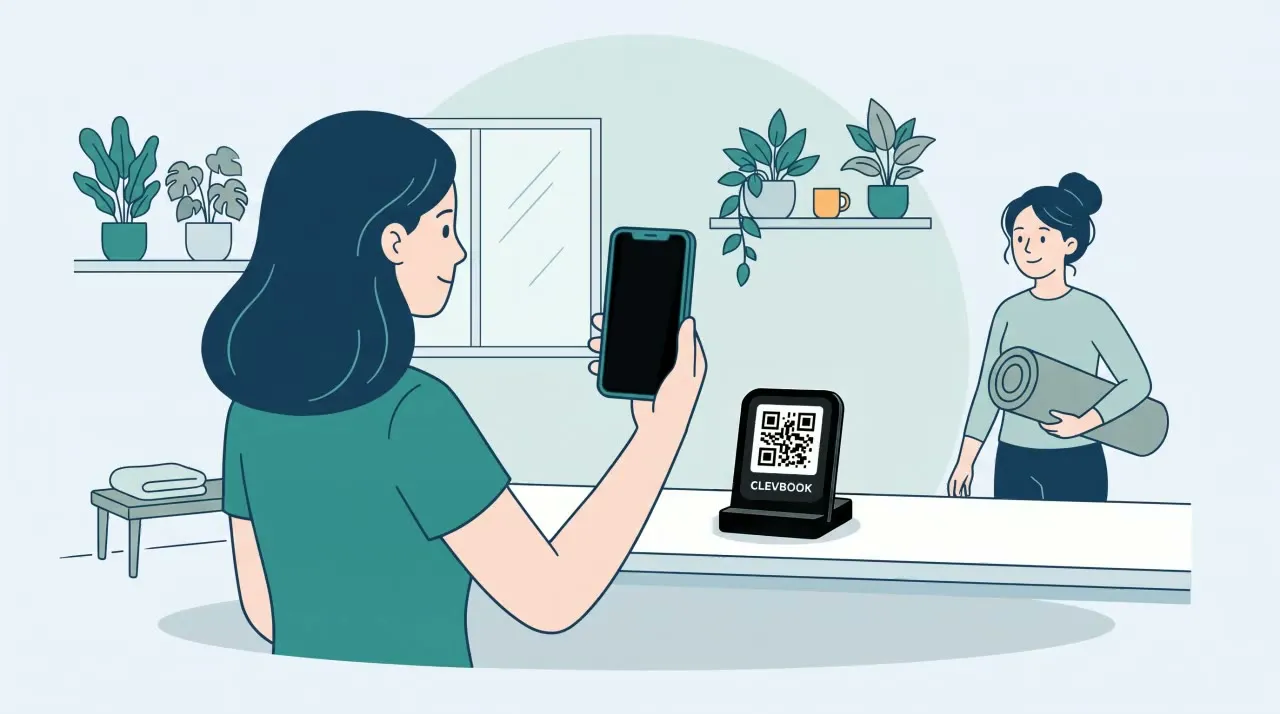
Open the link or QR code
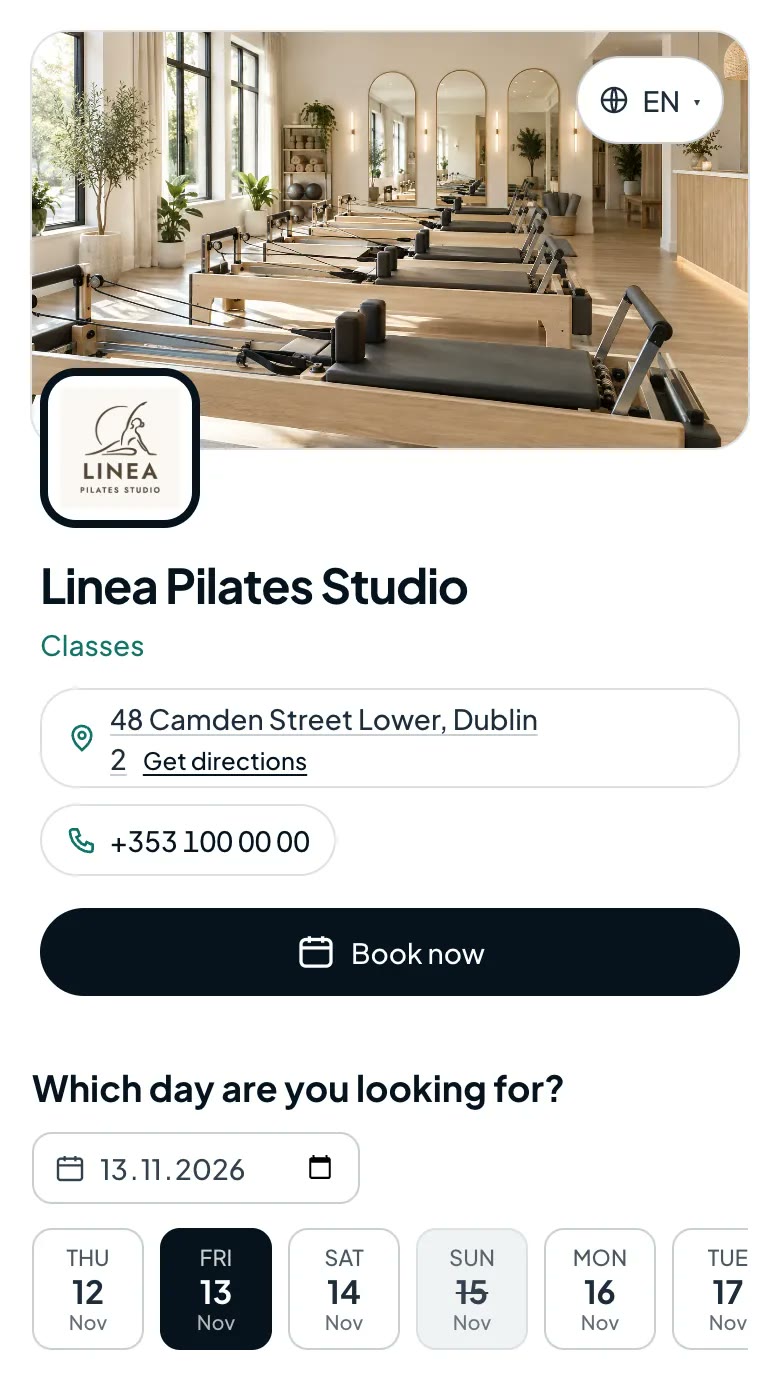
The studio’s page: cover photo, logo, address, “Book now”. No app, no account.
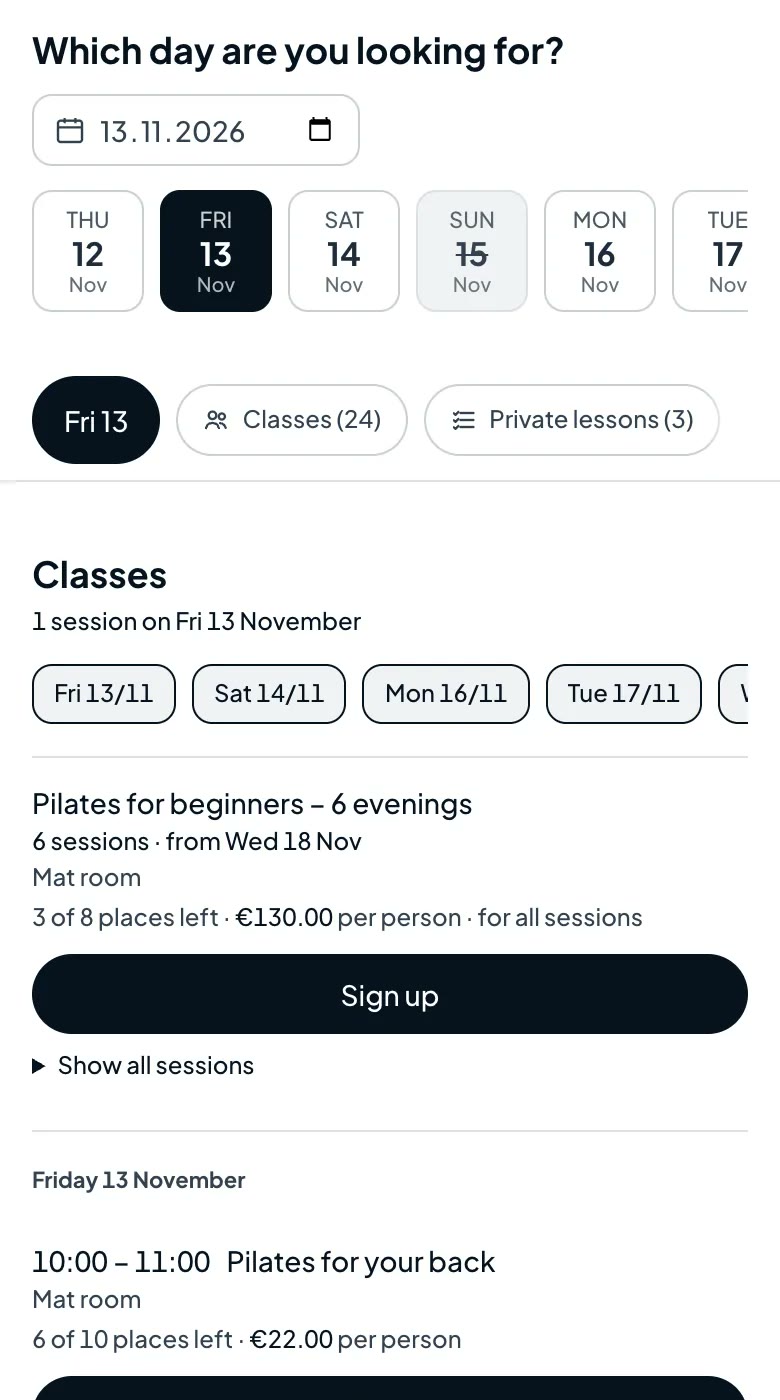
Pick a day
The next few days at a glance.
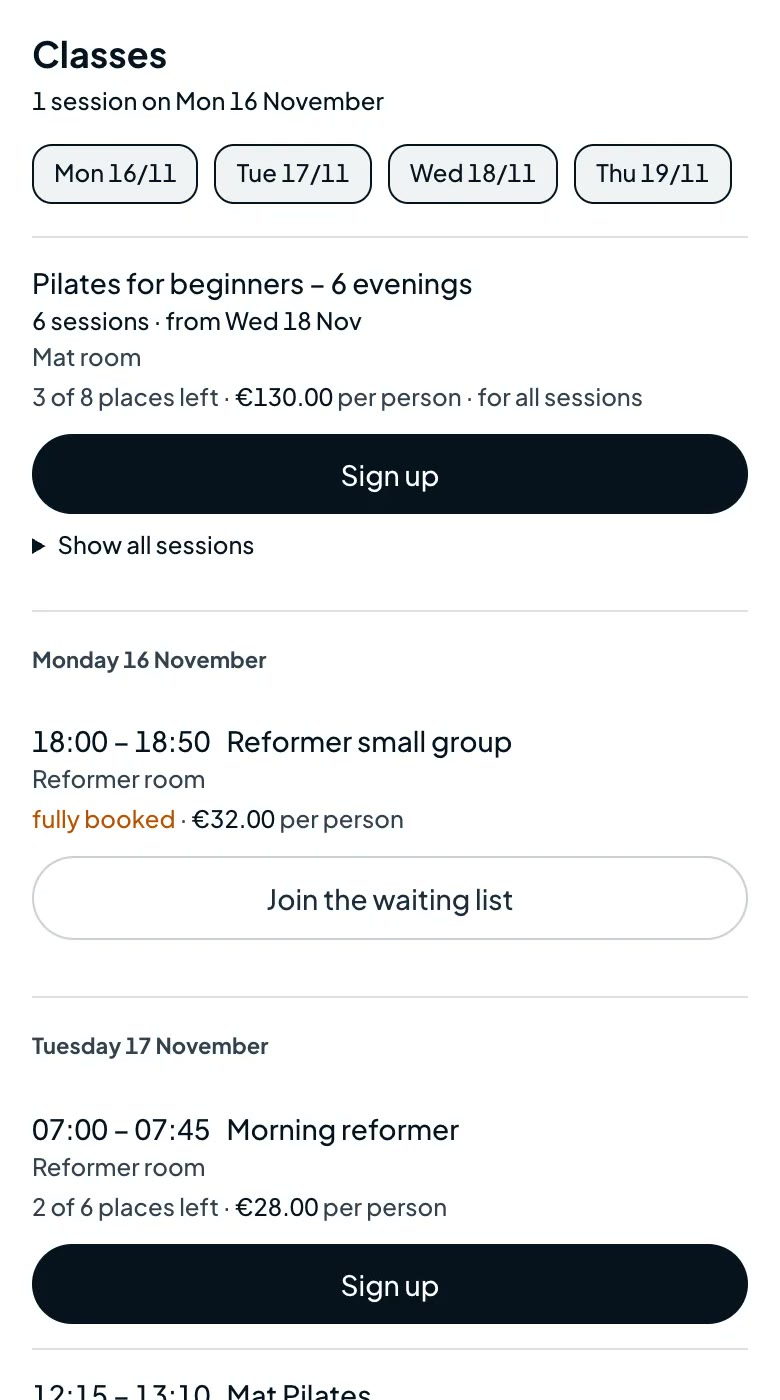
Browse classes
Reformer, mat, back care, prenatal: with instructor, room, price and free places. If a class is full, there's a waiting list.
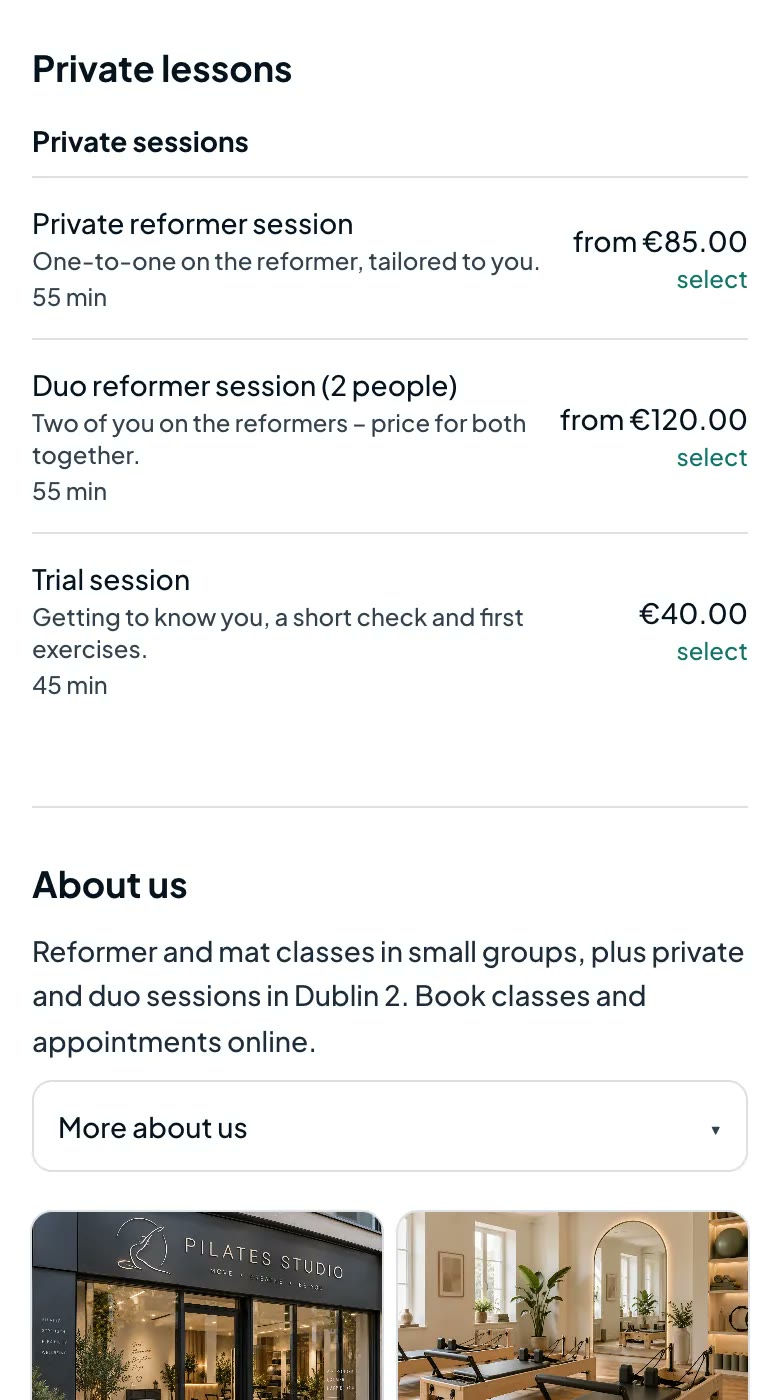
Or a private lesson
Private, duo or trial lesson, tailored to you.
Pick a person and a time
All free times that day, for example Grace at 17:00.
Name, number, e-mail
No password. Discount code and form where needed.
Confirmed, instantly
With time, instructor and price. Into your own calendar if you like.
It's in the studio's calendar
No call, no retyping, no double booking.
Nothing to install, no hardware, no technology of your own. A device with a browser is enough. We take care of the rest.
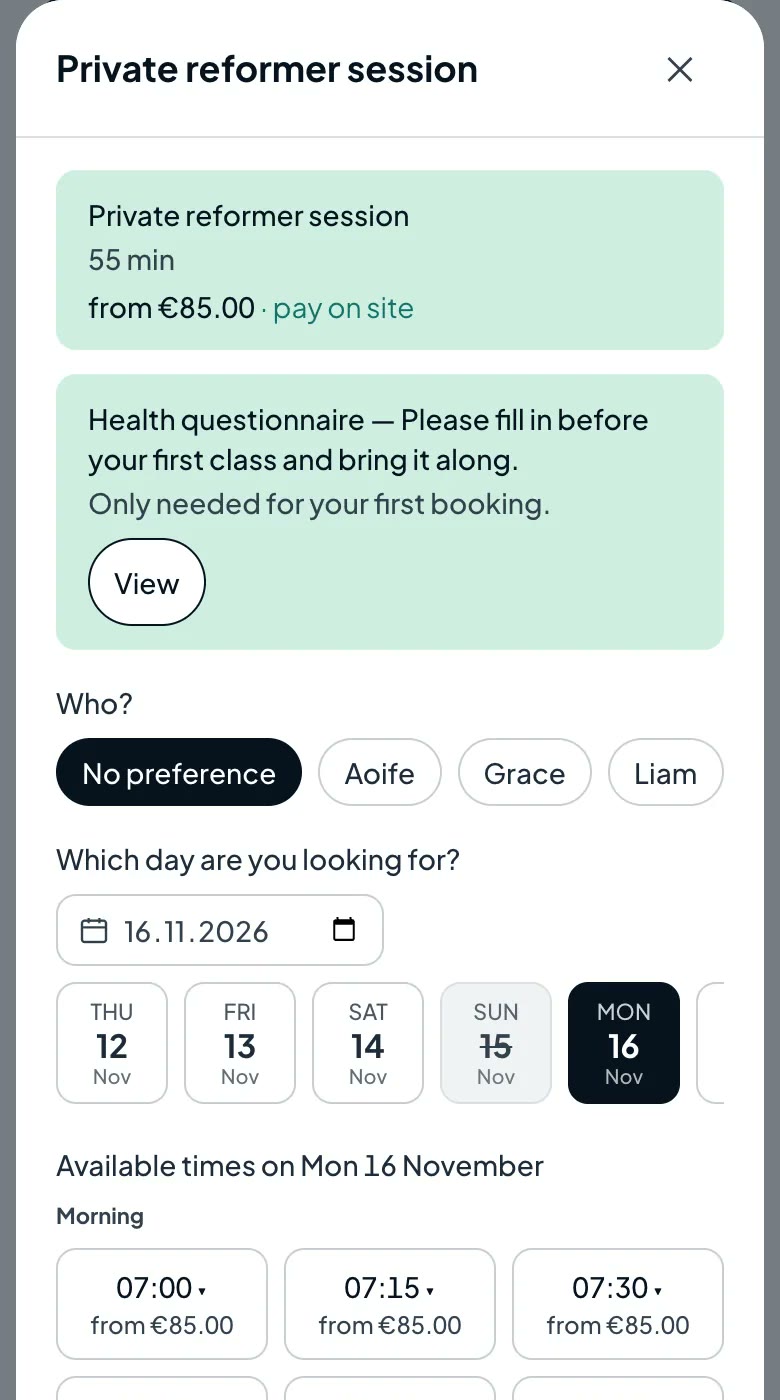
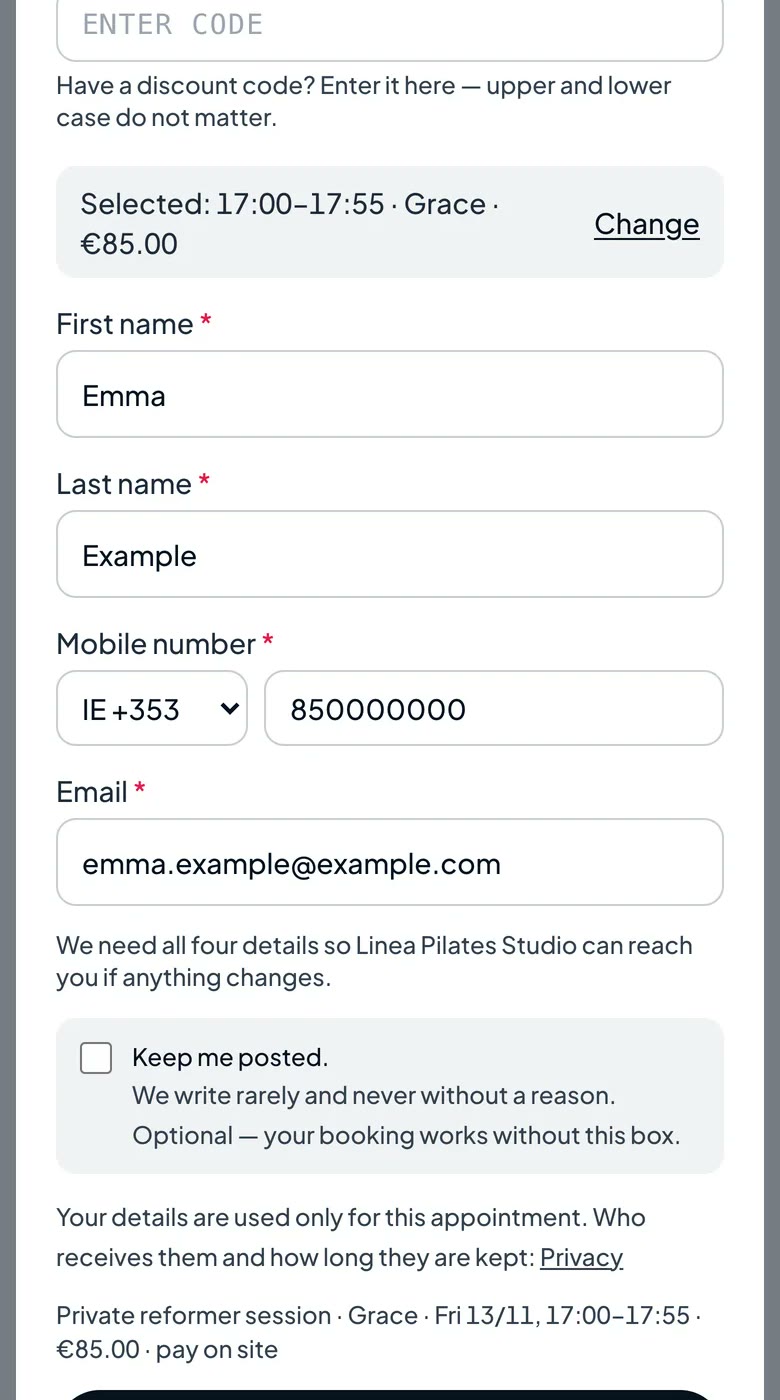
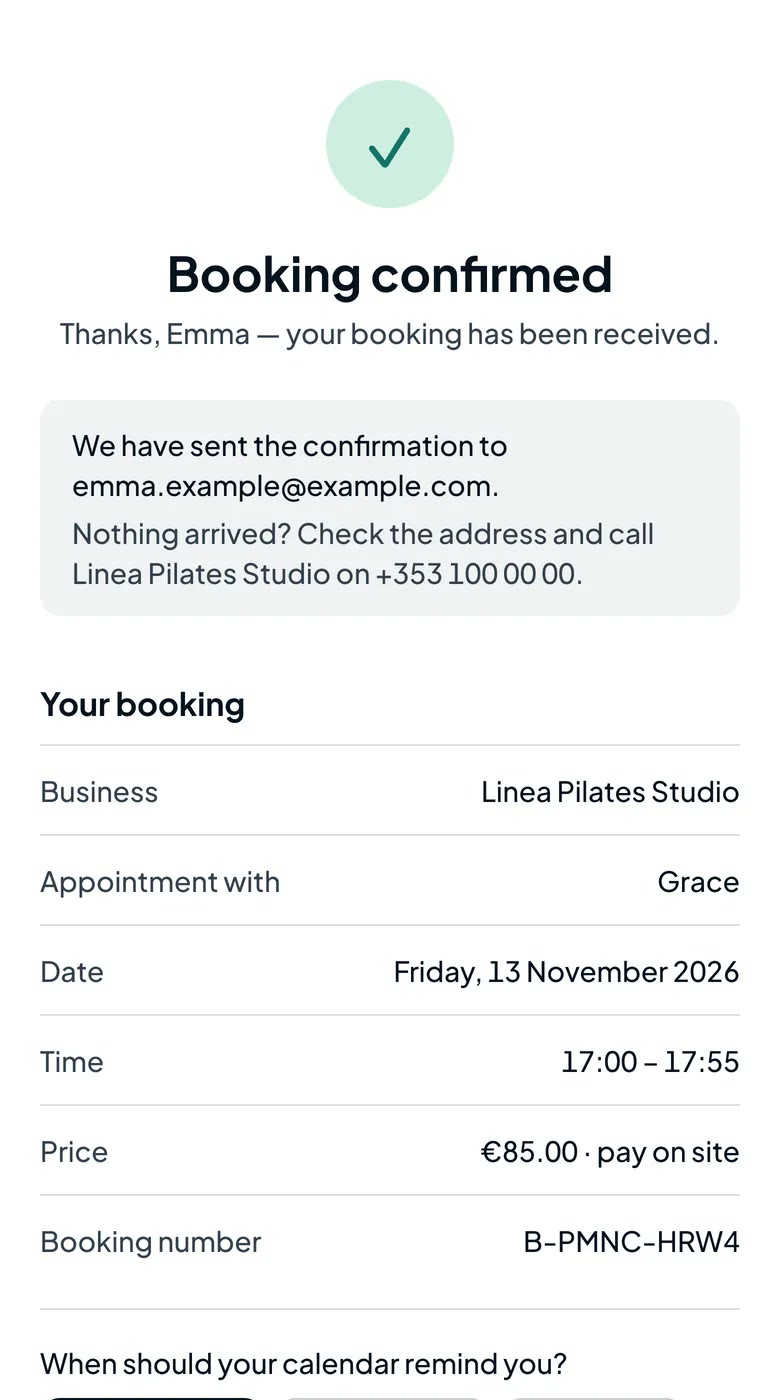
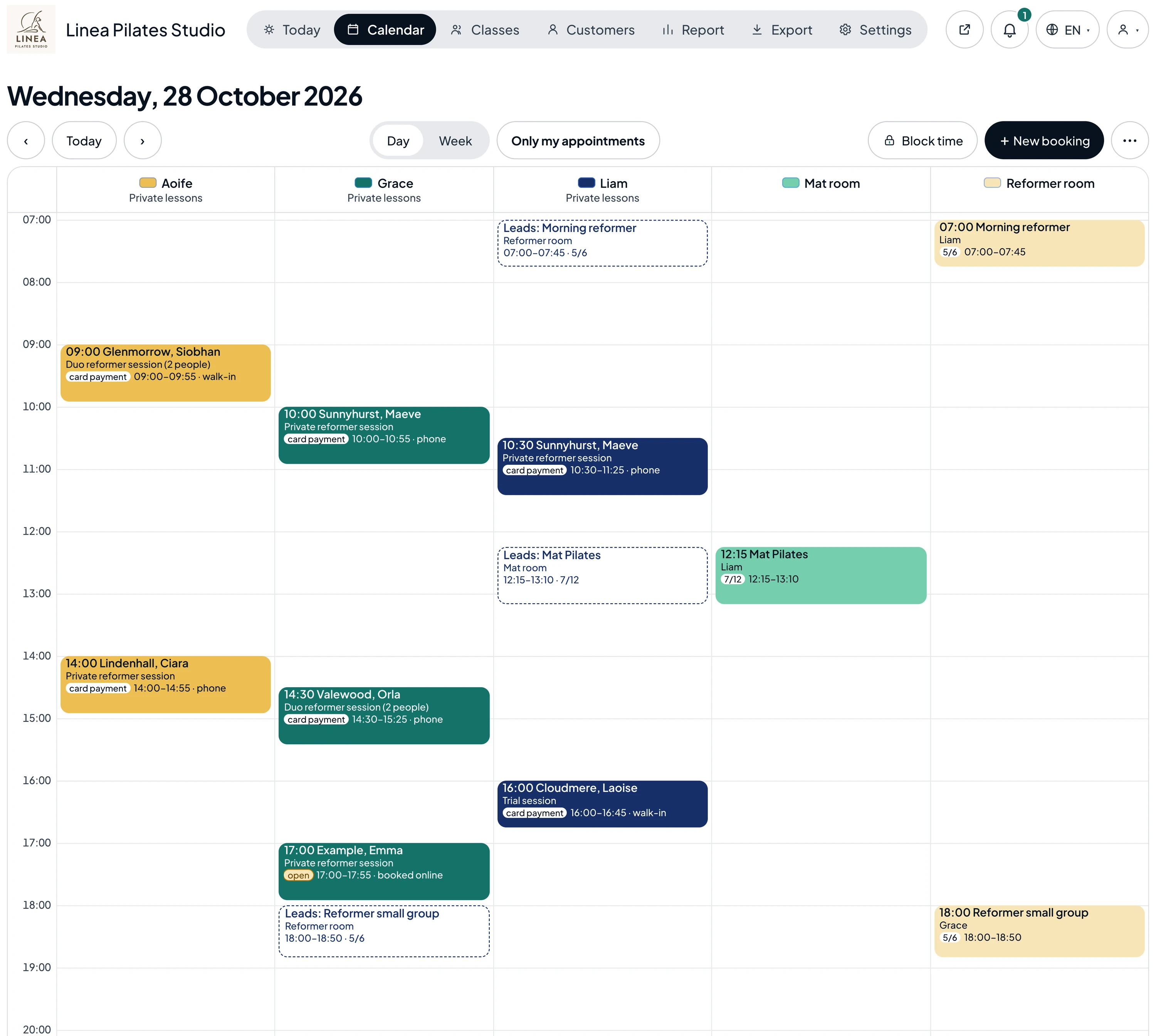
Three ways in. One calendar.
- Online
- Phone
- Walk-in

0double bookings
Taken is taken. Instantly and on every channel.
Your booking page
Set up in 15 minutes. What you get is your own website with a booking system.
No tech skills, no agency. You answer a few questions, upload photos and your logo, and your page is ready. Use it on its own with your own link and QR code, or add it to your existing website with a button.
- Cover photo and logo
- Address with “Get directions”
- “Book now”
- Available days
- Classes with free places
- Private lessons and appointments
- About us, photos, contact
- Multilingual
Setup
Seven steps to your page.
- Business type
- Venue
- Services
- Hours
- Prices
- Fine-tuning
- Preview & go live
At the end you see your finished page before you pay anything. If you like it, you go live.
And it grows with you. New features are added regularly.
Already included
- Classes with waiting list
- Multi-visit passes
- Gift vouchers
- Discounts and codes
- Forms before booking
- Pay online or on site
- Booking button for your website
- Spotlight for Google and AI
- Intro first
- Customer import from Excel
CLEVBOOK Voice, the AI phone assistant
It answers calls when you are busy and puts the booking straight into your calendar.
Features
Everything your operation needs. Nothing more.
Your own booking page with a QR code
Every facility gets its own page with photos, prices and free slots. Guests book without an app and without an account. A name, a mobile number and an e-mail address are enough, no password, no sign-up.
clevbook.com/linea-pilates-zurichThe workspace at reception
Calendar, customer list, classes and reports in one place. Create, move and cancel bookings, block time slots, including weekly series on several days at once. On the tablet at the counter as well as on a laptop.
Payment, whichever way suits
Cash or card on site, online by credit card. Plus TWINT in Switzerland and BLIK and Przelewy24 in Poland. Configurable per facility. The money goes straight to the operator's account. CLEVBOOK never touches it.
Customer list
Anyone who has booked before is recognised. The same number and the same surname are enough. Plus booking count, last visit and a note per customer. Bring your existing list in from Excel or CSV.
Numbers that add up
A daily and monthly list of all bookings with price, channel and payment method, ready to export. For accounting, for balancing the till, and reporting to the council.
Three languages, no app needed
Polish, German, English: the entire interface, right through to the booking confirmation. Your guests install nothing. A link or QR code opens in the browser, and anyone who wants to can put CLEVBOOK on their phone with two taps, just like an app.
Classes with sign-up and a waiting list
Recurring series such as “every Tuesday at 18:30”, sign-up with a participant count, and a waiting list when a class is full. Guests book a single session, the whole series, or use a multi-visit pass. Visits are deducted automatically. If you like, newcomers book an introduction first.
Missing something? We'll build it.
Tell us what is missing or awkward in daily use. That becomes the next feature. The features here came about the same way.
- Coming soon
CLEVBOOK Voice (AI phone assistant)
It answers calls when you are busy and puts the booking straight into your calendar.
CLEVBOOK Spotlight · included
Get found. On Google and in AI answers.
When someone searches, they should find you. Spotlight comes free for as long as you are a customer.
People search on Google and, more and more, with AI. CLEVBOOK Spotlight prepares your booking page for this: offer, location, prices, opening hours and classes in a form that search engines and AI can read. That improves your chances of being mentioned and linked.
What a search shows in the end is up to the search engine. We make sure your details get there correct and complete.
Linea Pilates Studio in Zurich-Unterstrass offers private Reformer lessons from CHF 110 as well as mat, back care and prenatal classes. Lessons can be booked directly online, no account needed. 1 Open Mon to Fri from 7 am, Sat from 9 am. 1
1 Linea Pilates Studio · Book online
clevbook.com/linea-pilates-zurich
Illustration with sample data from a made-up venue.
Who it's for
Different operators, the same problem.
CLEVBOOK sorts by what gets booked, not by profession. There are six categories. You pick them during setup, and several at once is fine.
Sports venueCourts, halls and facilities
Tennis and padel courts, sports halls, climbing halls, bowling alleys. And municipal sports centres that need public service without a phone queue and clean figures for the town’s books.
Example industries
- Tennis clubs
- Padel and pickleball facilities
- Badminton centres
- Squash centres
- Table tennis clubs
- Golf simulators and indoor golf
- Municipal and school gymnasiums
- Multi-purpose halls for clubs and events
- Municipal bowling and skittle alleys
- Fitness and activity rooms at sports centres
- Indoor soccer and small-pitch halls
- Football and artificial turf pitches
- Swimming lanes and ice rinks
Rooms & studiosRooms and halls
Meeting rooms, photo studios, rehearsal rooms, halls and event spaces. Booked by the hour.
Example industries
- Meeting rooms and conference rooms
- Coworking desks
- Music and rehearsal rooms
- Photo and recording studios
- Club rooms and community spaces
- Seminar and training rooms
- Community halls and village centres
- Art studios and workshop spaces
- Function and party rooms
- Sauna and wellness rooms
- Storage space and parking spaces
Hire & itemsRental by the hour
Boat rental, tools and equipment, event gear. If you hand out time or items, CLEVBOOK can hand them out for you, without anyone picking up the phone.
Example industries
- Boat and canoe rental
- Bike and e-bike rental
- Tool and equipment rental
- Event equipment and accessories
- Ski and snowboard rental
- Trailers and vans
- PA and lighting equipment
- Costume and crockery rental
- Camera and instrument rental
CoursesPer participant
Yoga, dance and other courses with a headcount and a waiting list. Single dates, series and course blocks.
Example industries
- Yoga and Pilates studios
- Movement and fitness classes
- Health and prevention courses
- Dance schools
- Course offerings at municipal sports centres
- Language and music courses
- Cooking and tasting classes
- First aid and training courses
- Children's gymnastics and holiday camps
- Workshops and talks
TeamAppointments with you and your team
Hair salons, beauty and massage studios, physiotherapy, workshops, consultations and office hours. Your customers pick the service, the person and the time, or “anyone will do”. If you work on your own, the question is skipped.
Example industries
- Hair and barber shops
- Beauty and nail salons
- Massage practices and wellness
- Physiotherapy and osteopathy
- Personal training and nutrition advice
- Coaching and consulting appointments
- Tattoo and piercing studios
- Driving schools and instructors
- Tutoring and study support
- Dog and pet grooming salons
- Garage and service appointments
- Appointment slots at councils and public offices
Order & pick upOrder ahead, skip the queue
Snack bar, café, bakery, food truck or drinks stand at an event. Your guests order ahead and pick up at the time they chose. No queue, no crowding, less stress behind the counter.
Example industries
- Snack bars and takeaways
- Cafés
- Bakeries and patisseries
- Pizzerias
- Food trucks and street food stalls
- Drinks stands at events
- Farm shops and butchers
- Ice cream parlours
- Lunch counters and canteens
- Catering
One decision-maker, no IT budget, no annual contract. Set up by yourself, with us alongside you at the start. Booking data held in Switzerland, database in Zurich.
Price
Everything included. Cancel monthly.
Prices for your country on request.
CLEVBOOK is launching in Poland. Join the waiting list. We will get in touch as soon as you can get started.
- Cancel monthly
- No commitment
- No small print
What you get. All included.
Bookings & calendar
- Booking page with QR code, no app, no account
- Courts, rooms, appointments with staff, rentals
- Calendar with blocked times, weekly series and several time windows per day
- Automatic e-mails and reminders
Classes & waiting lists
- Single classes, series and class blocks
- Waiting list that moves people up automatically
- Minimum number of participants
- Guests cancel their own sign-up
Customers & team with permissions
- Customer list with history and notes, import from Excel or CSV
- Team access with its own permissions
- History of who changed what in the team
- PDF forms before booking, optionally for new customers only
Payments, prices & discounts
- Pay on site or online to your account, no CLEVBOOK commission
- Prices by time of day and weekday
- Discount groups, codes and time-based offers with the regular price struck through
- VAT: net and gross prices
Get found: link, QR, AI and Google
- Link and QR code to print
- Booking button for your website, in your own style and colour
- CLEVBOOK Spotlight, a gift for as long as you're a customer: so new guests find you through AI and Google
- Guest page in Polish, English and German
Reports & export
- Reconciliation: cash, card and online kept apart
- CSV export: customers, bookings, classes
- Regular new features and updates
The fee on each online payment is taken by your payment provider, not by CLEVBOOK.
Questions & answers
What operators ask us most often.
Which businesses is CLEVBOOK for?
For any business that takes bookings for appointments, courts or class places. The industry does not matter. CLEVBOOK knows many kinds of offering, for example a tennis court, a meeting room, a rental boat and a yoga class, right through to a hair appointment, physiotherapy, a garage slot or a pre-order at a snack bar. Time is the limit: if nothing you offer is booked by time, you do not need booking software. A shop without time slots is not who we mean.
Do my customers need an account?
No. Only you as the business needs an account. Your guests book via a link or a QR code: pick a time, enter first name, last name, phone number and e-mail, done. No sign-up, no app, no password. Not for courses either, and not when they pay online.
Does everything have to be paid online?
No, you decide. Three options: pay on site only · paying online possible but voluntary, so the guest chooses and both ways run side by side · paying online required. You switch between them in the settings whenever you like.
What does CLEVBOOK cost, and do you take commission?
A fixed amount per month, no matter how much gets booked. No commission, neither on bookings nor on payments. Anyone paying online pays straight into your business account at your own payment provider. The money never passes through CLEVBOOK. Your payment provider’s fee applies as it always would. It goes to them, not to us.
Do new features get added, and do they cost extra?
Currently no. We do not know what the future holds, so we would rather not promise it. What we can say for certain is this: we work fast, new features keep arriving, and they arrive for everyone at the same time.
Where is my guests’ data held?
The database is in Switzerland, in Zurich. In a country the European Commission recognises as providing an adequate level of data protection. You can download your data yourself at any time: customer list, bookings and course participants as a CSV file, the whole record or a chosen period, in the “Export” area.
Can I bring my existing customer list?
Yes. In the customer list, choose “Import customers” and upload an Excel or CSV file with up to 5,000 people. A preview first shows who is new, who already exists and which rows have errors. Remaining visits on multi-visit passes come along if that pass already exists in CLEVBOOK. Imported people receive no text message and no e-mail and count as regular customers. You can undo the import for 72 hours, as long as nobody from it has booked or used a pass. You can check the file straight away and import it once your subscription is running.
Can new customers be asked to do an intro first?
Yes, if you want. It is off by default. It works for any kind of business: an intro at a Pilates studio, a belay check at a climbing gym, an induction at a workshop. You choose which class, appointment, court or room is the intro and which offers can only be booked afterwards. After the visit, CLEVBOOK unlocks customers by itself, or you unlock them with one tap. Customers who have already booked with you can be unlocked right away if you wish. Guests see locked offers with a padlock, the reason and a button to book the intro. For these offers they confirm their mobile number. At the front desk you can always book freely.
Is CLEVBOOK suitable for practices that bill health insurance?
Yes, for example physiotherapy, occupational therapy or speech therapy. Once you switch on health insurance, guests choose on your page between paying themselves and going through their health insurance. In Switzerland and Liechtenstein, insurance appointments are booked online without a price and without online payment, and the patient can scan the medical prescription with their phone after booking. It is encrypted on their device, and only your practice can open it. In Poland, patients currently see a request to call under “NFZ”, with your phone number.
Can I release several follow-up appointments for a guest?
Yes, with the appointment series. You release a number of appointments for a guest up to an end date, and the guest books them via a personal link sent by email. If the guest cancels an appointment, the slot goes back into the series. A no-show does not use one up. Whatever is not booked by the end date expires. You can also enter appointments for the guest yourself. For each service you choose whether a series starts only after your approval or the guest may book it freely. This suits any business where guests come several times, from treatments to consulting to training. For insurance appointments with a prescription (Switzerland and Liechtenstein), a series is always released by you first. Not included yet: reminders for open appointments, rescheduling by the guest and online payment for the whole series.
Not open yet
CLEVBOOK isn't public yet.
But soon.
We are launching in Poland and set up the first accounts by hand. If you want to be part of it, join the waiting list. We will get in touch as soon as you can get started. No account, no obligation.
Country, e-mail, one click to confirm. Nothing more.